
iPhone
Limit Adult Websites not working? What to check
When adult sites still load with Limit Adult Websites on, it’s usually one of three things: the setting isn’t actually active, the site isn’t one Apple’s filter knows about yet, or the content is inside an app rather than on a website. Check the settings below, add the site to Never Allow, then update and restart your iPhone.
If a site on your Never Allow list still loads after all that, you’ve likely hit a bug. People have reported those in Apple’s forums too, and the fix is to report it to Apple.
Quick answer: In Settings → Screen Time → Content & Privacy Restrictions, make sure the switch at the top is on and App Store, Media, Web, & Games → Web Content says Limit Adult Websites. Add the site under Never Allow, update iOS, and restart.
Check these first
- Content & Privacy Restrictions is switched on. Open Settings → Screen Time → Content & Privacy Restrictions and check the switch at the top. Apple says that while it’s off, every restriction under it is paused, even though your choices are still saved.
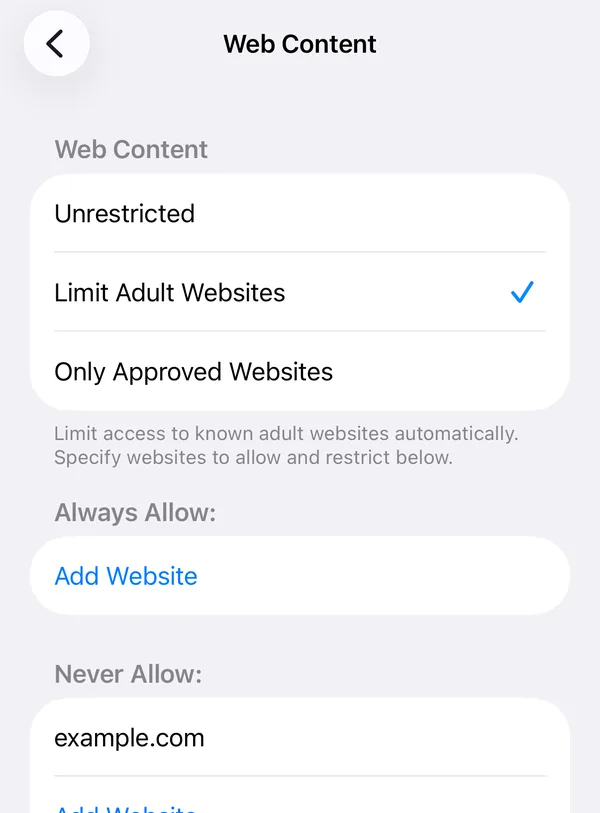
- Web Content says Limit Adult Websites. Tap App Store, Media, Web, & Games → Web Content. If it says Unrestricted, choose Limit Adult Websites. On iOS 27, look for Web Content on the Content & Privacy Restrictions screen.
- Add the site to Never Allow. On the same screen, tap Add Website under Never Allow and type the site’s address. Apple’s automatic filter doesn’t know every site; this list does exactly what you tell it. Mainstream sites can go on it too, if they’re where you slip. It blocks the whole site, not just the adult parts.
- Close Safari and give it a moment. One Apple Community member reports the setting can take about 15 seconds to apply, and that Safari has to be closed and reopened before Private Browsing goes away.
- Update iOS. Open Settings → General → Software Update. Several of the reports below were tied to specific iOS versions.
- Restart your iPhone. It’s the step Apple Community replies suggest most often, and it costs a minute.
- Check for a work or school profile. If your iPhone is managed by an employer or school, their profile can set its own web rules, which can clash with yours. Ask whoever manages it.
Why adult sites can still load: the filter’s limits
Some of what looks like the filter “not working” is the filter doing exactly what it was built to do, and no more.
- It’s automatic, and it guesses. Apple describes the setting simply as blocking adult content. It doesn’t publish its list or how it decides. New sites appear every day, so some get through, and some harmless pages get blocked by mistake.
- It filters websites, not apps. Explicit posts in social and messaging apps aren’t websites to the filter, so they aren’t touched. Use each app’s own sensitive-content settings as well: Reddit, X.
- Search results are separate. Google says SafeSearch only works on Google Search and is its own setting. Forum reports say Limit Adult Websites puts search engines in safe mode in Safari, but not in the browsers built into other apps. Set SafeSearch to Filter yourself: how to lock SafeSearch.
- Other browsers. The filter is part of iPhone, not a Safari setting, so it’s meant to cover the other browsers on your iPhone as well. If a site you added to Never Allow loads in any browser, treat it as a bug and report it.
- Private Browsing disappearing is normal. With the filter on, iPhone switches off Private Browsing in Safari. That’s the filter working.
Known problems reported in Apple’s forums
None of these threads ended with a fix from Apple. We found no reports specific to iOS 26 or iOS 27 as of 14 October 2026.
| Reported | iOS version | What happened |
|---|---|---|
| January 2023 | Latest at the time | A major adult site loaded in Safari with the filter on. Another member couldn’t reproduce it and suggested reporting a bug. |
| March 2023 | Not stated | Safe search was enforced in Safari but not in the browsers built into other apps. |
| April 2023 | iOS 16 | A site on the Never Allow list still loaded, on two different iPhones. |
| August 2024 | iPadOS 17.5.1 and 17.6 | The Never Allow list stopped working after Downtime was first used. Restarting and updating didn’t help. |
| September 2025 | iOS 18 | Private Browsing stayed available. A reply said the setting takes about 15 seconds and a Safari restart to apply. |
If you hit one of these, send it to Apple through apple.com/feedback or Apple Support. Bugs only get fixed when Apple hears about them.
When it works, make it hold
For most people the real weakness isn’t the filter. It’s that switching it off takes four taps and nobody is told. Two free fixes:
- Let someone else set your Screen Time passcode, so the filter can’t be changed without them. Steps in how to block porn on iPhone.
- Set Deleting Apps to Don’t Allow in Content & Privacy Restrictions → App Installations & Purchases, if you also use a blocker app.
Where QUIT fits
We make QUIT, and on iPhone it uses this same Apple filter. So it won’t catch sites Apple’s filter misses, and it can’t fix an iOS bug. What it changes is how easy the filter is to walk away from:
- Strict Mode: turning the shield off inside QUIT takes a 24-hour wait, or a partner’s approval. No passcode holder needed.
- An optional delete lock: while the shield is on, iPhone won’t let any app be deleted, QUIT included.
- A Panic Button and an AI coach for the minutes when you’d otherwise go looking for the gap.
Settings paths from Apple’s iPhone User Guide (iOS 26) and Apple Support’s parental controls article, checked 14 October 2026. Apple’s description of the filter from its ManagedSettings developer documentation, checked 14 October 2026. Problem reports from the Apple Community threads linked above, read 14 October 2026.
Questions people ask
Why can’t I use Private Browsing in Safari any more?
While Limit Adult Websites is on, iPhone switches off Private Browsing in Safari. That is how the filter behaves, not a fault.
How long does Limit Adult Websites take to start working?
Usually straight away. One Apple Community member reports it can take about 15 seconds, and that Safari may need to be closed and reopened before Private Browsing disappears.
Does Limit Adult Websites block explicit posts in apps like X or Reddit?
No. It filters websites, not what appears inside apps. Some apps have their own sensitive-content settings, which are worth turning on as well.
Why is a normal website blocked?
The filter is automatic, so it sometimes blocks harmless pages. Add the site to the allowed list on the same Web Content screen.
Is there a better filter than Limit Adult Websites on iPhone?
Other blockers use different tools, but none can go past what Apple allows. For most people the bigger problem is not the filter but how easy it is to switch off, which a passcode held by someone else or a delay fixes.