
Blocking
A porn blocker that can’t be deleted: what actually holds
No blocker on a phone you own is truly impossible to delete: Apple and Google both keep the final say with the phone’s owner. What you can get is a blocker that can’t be deleted or switched off quickly, and that’s what matters, because urges usually pass within minutes.
This page explains what makes a blocker hold on iPhone and on Android, and how to set one up so the decision gets made by the calm version of you, not the 1am one.
Quick answer: On iPhone, turn on Limit Adult Websites, set Deleting Apps to Don’t Allow, and let someone else set the Screen Time passcode. On Android, use a blocker with a delay before it can be turned off (QUIT’s Strict Mode waits 24 hours), make it your Always-on VPN, and add a partner who’s told if it goes quiet.
Why friction beats willpower
A blocker rarely gets deleted as a calm decision. It tends to happen late, in a low mood, in the space of a minute, which is exactly when willpower is weakest. A delay works because it moves the decision: if switching off takes 24 hours, the urge is long gone before the switch is.
Four things make a blocker hold:
- The off switch is slow. A wait of hours, not seconds.
- Someone else is involved. A passcode they keep, or a request they approve.
- It can’t be removed quietly. A lock on deleting, or an alert when it goes off.
- It was set up when you were calm. Rules made in a good hour protect you in a bad one.
On iPhone: what makes a blocker hold
Apple’s own Screen Time passcode is the strongest lock on an iPhone, and it’s free. If someone else holds it, nobody can change your Screen Time settings without them.
- Turn on the filter: Settings → Screen Time → Content & Privacy Restrictions, switch it on, then App Store, Media, Web, & Games → Web Content → Limit Adult Websites. Full steps in how to block porn on iPhone.
- Stop apps being deleted: in Content & Privacy Restrictions, tap App Installations & Purchases and set Deleting Apps to Don’t Allow. This covers every app, including any blocker you install.
- Hand your iPhone to someone you trust and let them set the passcode: Settings → Screen Time → Lock Screen Time Settings (on iOS 27: Screen Time → Manage Screen Time → Lock Screen Time Settings). If iPhone offers Screen Time Passcode Recovery, let them decide that step too.
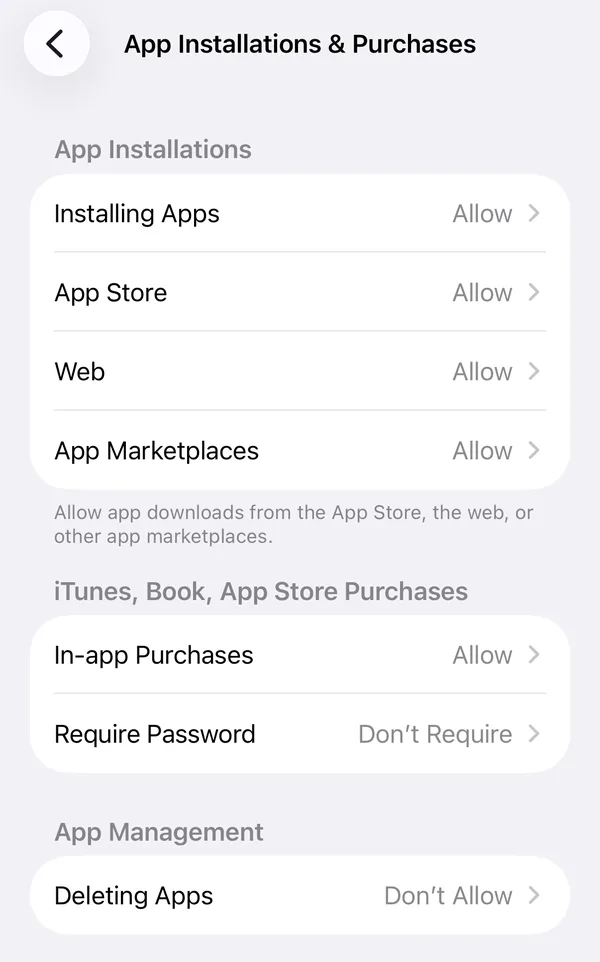
What holds: the filter and the no-deleting rule, for as long as you don’t know the passcode.
What doesn’t: without a passcode holder, both are a few taps to undo. And you’ll need that person for every Screen Time change, including ordinary ones.
With QUIT on iPhone
QUIT is for when you don’t have someone to hold a passcode, or don’t want them involved in every settings change. It switches on the same Apple filter, then adds:
- A delete lock (optional). While your shield is on, iPhone won’t let any app be deleted, QUIT included. Turning the lock off is a request that unlocks after 24 hours, or sooner if your partner approves.
- Strict Mode (on by default). Turning the shield off inside QUIT takes the same 24-hour wait or partner approval.
- Honest limits. No App Store app can make itself impossible for the phone’s owner to switch off. If QUIT finds your shield off when you open it, it tells you, and your partner if you chose to share.
More on how it works in QUIT on iPhone.
On Android: what makes a blocker hold
Android’s free filter, a family-safe Private DNS, takes three taps to switch off and tells nobody. A blocker app can do more, if it’s set up to hold.
- Choose a blocker with a delay. In QUIT, Strict Mode turns switching protection off into a request that unlocks after 24 hours, or sooner if an accountability partner you chose approves it.
- Make it your Always-on VPN. QUIT filters through Android’s VPN feature. Open Settings, search for VPN, tap the gear next to QUIT Shield and turn on Always-on VPN. Leave “Block connections without VPN” off. Android then starts the shield when the phone boots and keeps it running.
- Add a partner and share shield alerts. They’re told if Always-on is turned off, if protection is switched off outside the app, or if the shield goes quiet for about an hour.
What holds: the 24-hour wait, Always-on keeping the shield running, and a partner who hears about changes.
What doesn’t: QUIT doesn’t stop you uninstalling it on Android. It makes sure it doesn’t happen in secret: if you share shield alerts, your partner is told within about an hour that your shield went quiet.
Side by side
| Setup | Time to switch off | Who finds out | Cost |
|---|---|---|---|
| iPhone: Screen Time, no passcode | Seconds | Nobody | Free |
| iPhone: Screen Time + a passcode someone else holds | As long as it takes to ask them | They do, because you have to ask | Free |
| iPhone: QUIT (Strict Mode + delete lock) | 24 hours inside QUIT, or partner approval | You, and your partner if you share, when QUIT finds the shield off | Subscription after a 7-day free trial |
| Android: family Private DNS | Seconds | Nobody | Free |
| Android: QUIT (Strict Mode + Always-on VPN) | 24 hours, or partner approval | Your partner, if you share shield alerts | Subscription after a 7-day free trial |
Other blockers
What two other apps say about switching off, from their own pages, checked 14 October 2026:
- BlockerX: “Prevent Uninstall” on Android is a Premium feature. (BlockerX Premium)
- Covenant Eyes (Victory): On Android you can uninstall from inside the app; the uninstall shows in your ally’s activity feed and is flagged for review. (Uninstalling on Android)
Set it up on a good day
- Decide the rules when you’re calm, not in the middle of an urge.
- Tell one person. A lock someone else knows about is much harder to quietly undo, and a slip stops being a secret.
- Expect the urge anyway. A blocker removes the easy path, not the urge. What helps in those minutes is a plan: how to ride out an urge.
For device-by-device blocking steps, start at how to block porn on any device.
iPhone steps from Apple’s iPhone User Guide (iOS 26 and iOS 27) and Apple Support, checked 14 October 2026. Always-on VPN from Android’s developer documentation, checked 14 October 2026. QUIT’s behaviour from the QUIT app (version 1.0). Other apps’ facts from their own pages, checked 14 October 2026.
Questions people ask
Is there a porn blocker that can’t be bypassed?
No blocker on a phone you own is impossible to get around. The good ones make getting around them slow and visible: a delay before they can be turned off, a partner who has to approve, and an alert if protection goes quiet.
How do I stop myself deleting apps on iPhone?
In Settings → Screen Time → Content & Privacy Restrictions → App Installations & Purchases, set Deleting Apps to Don’t Allow. Have someone else set the Screen Time passcode so you can’t simply switch it back.
What happens if I uninstall QUIT on Android?
The shield stops. If you added a partner and share shield alerts, they are told within about an hour that your shield went quiet. QUIT doesn’t stop you uninstalling it on Android; it makes sure it doesn’t happen in secret.
Does QUIT’s iPhone delete lock stop me deleting other apps too?
Yes, while your shield is on. iPhone can only lock deleting for every app at once, which is why the delete lock is optional.
What if I need to turn protection off for a real reason?
Send a request in QUIT. It unlocks after 24 hours, or straight away if your partner approves it.