
iPhone
A porn blocker for iPhone that’s hard to switch off
QUIT blocks adult websites on your iPhone by switching on Apple’s own Screen Time adult-website filter, for Safari and the other browsers. Then it makes that filter hard to switch off on impulse, with a 24-hour Strict Mode and an optional delete lock, and gives you a Panic Button and a coach for the moment an urge hits.
It doesn’t filter better than Apple, because it is Apple’s filter. This page explains what QUIT adds, what no iPhone blocker can do, and when the free setup is the better choice.
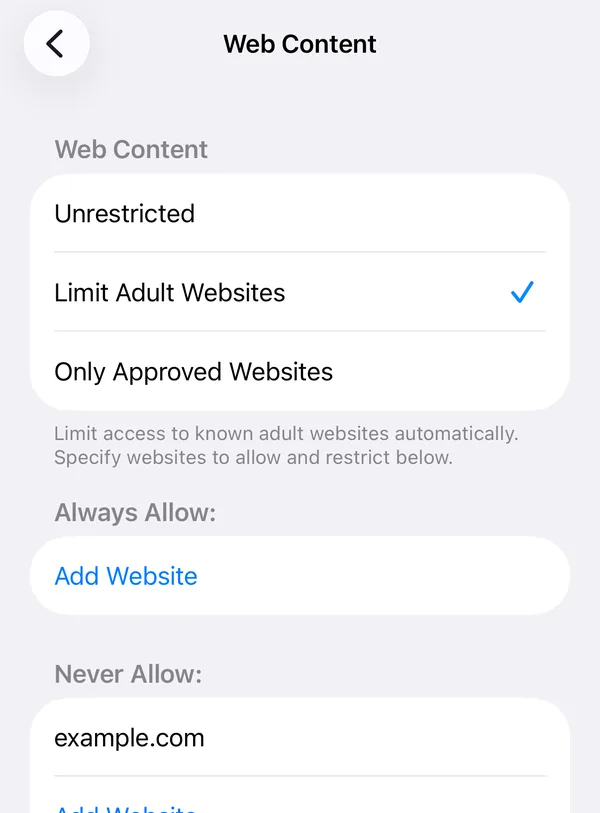
Quick answer: If you only want the filter, it’s free in Settings → Screen Time: here are the steps. QUIT is for keeping it on: a 24-hour wait before the shield can be turned off, a delete lock, and help in the hard moments. QUIT for iPhone is in App Store review now.
How QUIT works on iPhone
- Allow Screen Time access. QUIT asks iPhone for permission to use Screen Time on your own device. You approve it once with Face ID or your passcode.
- Turn on your shield. QUIT switches on Apple’s adult-website filter. Blocked sites show iPhone’s own block page. While the shield is on, iPhone also switches off Private Browsing in Safari. A Test my shield button opens a harmless test page so you can see it working.
- Strict Mode is on from the start. Turning the shield off inside QUIT becomes a request that unlocks after 24 hours, or sooner if an accountability partner you chose approves it. Urges pass long before that.
- Optional: turn on the delete lock. In Me → Protection. While your shield is on, iPhone won’t let any app be deleted, QUIT included. iPhone can only lock deleting for every app at once, so this is your call. Turning it off goes through the same 24-hour wait.
What it catches, what it misses, how easy it is to undo
What it catches: websites Apple’s filter classes as adult, in Safari and the other browsers on your iPhone.
What it misses: adult content inside apps such as social feeds and messages, and new sites Apple’s filter hasn’t classified yet. iPhone also never tells apps what it blocked, so QUIT on iPhone shows no blocked-sites count.
How easy to undo: inside QUIT, a 24-hour wait or your partner’s approval. Apple doesn’t let any App Store app make itself impossible for the phone’s owner to switch off, so no iPhone blocker is truly locked. If QUIT finds your shield off when you open it, it tells you, and your partner if you chose to share.
QUIT or Screen Time on your own?
| Screen Time on your own | Screen Time + a passcode someone else holds | QUIT | |
|---|---|---|---|
| The filter | Apple’s adult-website filter | The same | The same |
| Turning it off | A few taps | Only with that person | 24-hour wait or partner approval inside QUIT |
| Deleting apps | Can be blocked, a few taps to undo | Blocked behind the passcode | Optional delete lock, 24 hours to undo |
| When an urge hits | Nothing | You can call them | Panic Button, AI coach, audio lessons, an anonymous forum |
| Progress | Screen Time reports | Screen Time reports | Daily check-in, a streak that never erases earned days, an island and a companion that grow |
| What it needs | Nothing | Someone willing to be asked for every Screen Time change | A subscription after a 7-day free trial |
Our honest take: if someone you trust will hold a Screen Time passcode, that free setup is the strongest lock you can put on an iPhone. QUIT is for when you don’t have that person, or don’t want them involved in every settings change, and for the part no filter touches: the next ten minutes of an urge.
What no iPhone porn blocker can do
- Go past Apple’s limits. Every App Store blocker works through tools Apple provides, and Apple keeps the final say with the phone’s owner. So no App Store blocker can honestly promise it can never be switched off.
- See inside every app. Website filters see websites. A social feed or a chat isn’t one.
- Catch every new site on day one. Filters work from what they already know.
- Make the urge go away. Blocking removes the easy path. What you do in the next ten minutes is a skill: how to ride out an urge.
Built for the hard moment, not just the filter
- Panic Button: breathe through an urge with your companion and see your own reasons for quitting.
- An AI coach (a fox) you can talk to at any hour, without judgement.
- Five short audio lessons on urges, triggers and slips.
- Daily check-in and streak. A slip restarts the streak but never erases the days you earned.
- An island that grows with clean days, and a companion (fox, owl, bunny, bear or cat) that evolves all the way to day 1000.
- The Commons, an anonymous forum, plus a journal and an optional accountability partner.
Private by design
iPhone does the filtering. QUIT never learns which sites you visit or which were blocked, and nothing about your browsing is sent to us. Read the privacy policy for the details.
Price and availability
QUIT is a subscription: a 7-day free trial on the yearly plan, then $49.99 a year. There are also monthly ($9.99) and weekly ($4.99) plans. There’s no free tier. QUIT is for adults (18+) blocking porn for themselves; it isn’t parental control.
QUIT for iPhone is in App Store review. Leave your email below and we’ll tell you the day it’s live. Want to start tonight instead? The free Screen Time steps work right now. For Android, see how to block porn on Android, and for every device, how to block porn.
How QUIT works on iPhone is described from QUIT’s iPhone app (version 1.0) and its App Store listing. Screen Time details from Apple’s iPhone User Guide and Apple Support, checked 14 October 2026.
Questions people ask
Is there a free porn blocker on iPhone?
Yes. Screen Time has one built in: Limit Adult Websites, under Content & Privacy Restrictions. QUIT uses that same Apple filter. What you pay for is everything around it: the 24-hour Strict Mode, the delete lock and help when an urge hits.
Can a porn blocker block porn in every app on iPhone?
Not through Apple’s adult-website filter, which covers websites in Safari and the other browsers. It doesn’t filter what appears inside apps like social feeds or messages. QUIT doesn’t claim to block inside every app on iPhone.
Can I delete QUIT on impulse?
Not with the delete lock on. While your shield is on, iPhone won’t let any app be deleted, QUIT included. Turning the lock off is a request that unlocks after 24 hours, or sooner if your partner approves.
Can QUIT see what I browse?
No. iPhone does the filtering itself and never tells QUIT which sites you visit or which were blocked, so there is nothing for us to see or store.
Is QUIT a parental control app?
No. QUIT is for adults (18+) who want to block porn for themselves, on their own iPhone.